
Workspace architecture
The workspace is a shared interface between human judgment, machine assistance, project memory, and versioned deliverables. Its architecture is designed around responsibility boundaries.
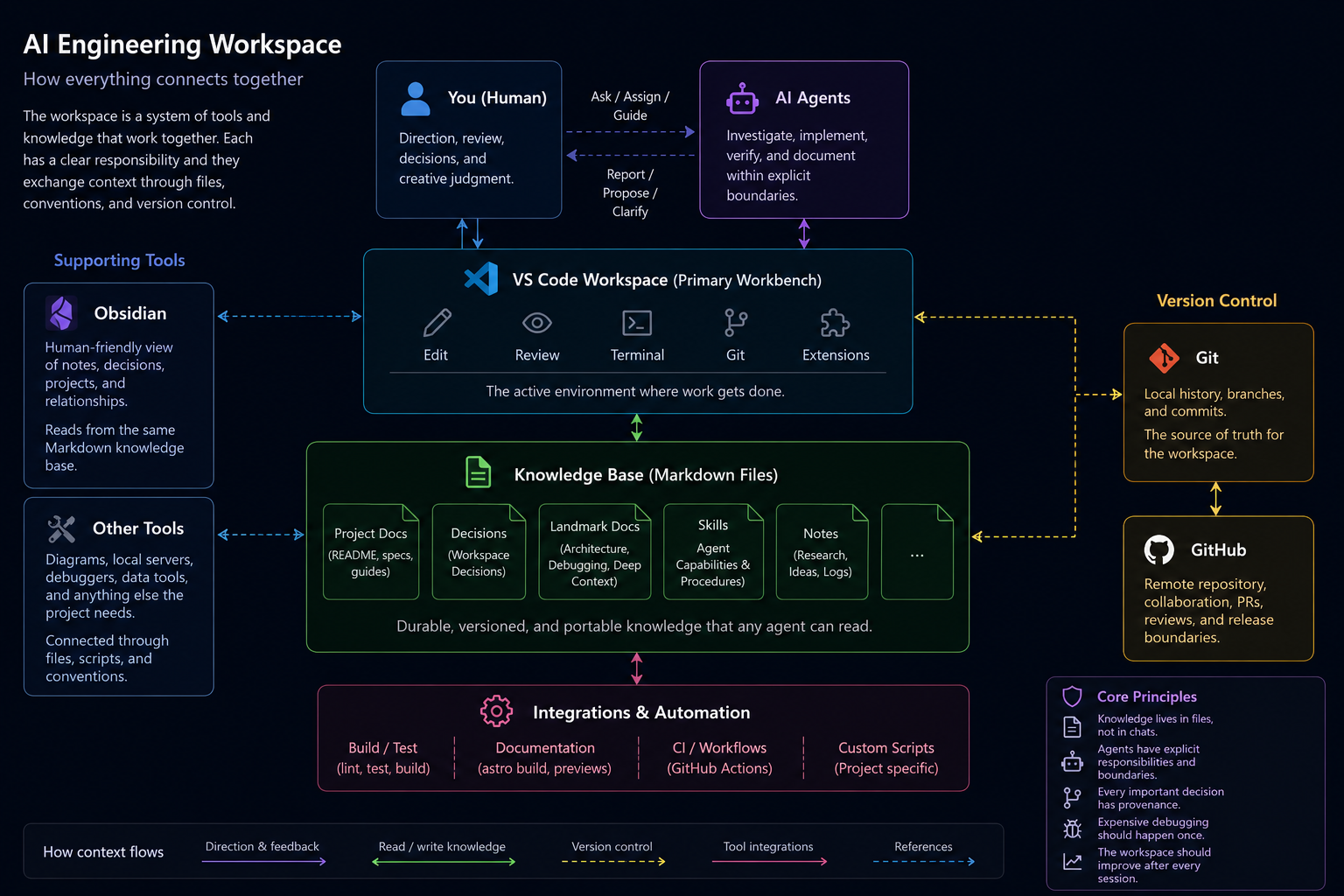
Obsidian-compatible Markdown ↕ durable knowledge, research, decisionsShared project workspace ↕ source files, task state, agent instructionsVS Code ↕ human editing, terminals, reviewAI agents ↕ investigation, implementation, verificationGit and GitHub ↕ history, collaboration, deploymentThe arrows matter. Information should move between layers, but each layer should remain useful on its own.
Workspace knowledge
Section titled “Workspace knowledge”The workspace root holds information that applies across projects: current goals, the project index, bootstrap guidance, shared skills, and operating conventions. This is the smallest amount of context needed to orient a new session.
Project-specific facts stay with their project. This prevents a global instruction file from becoming a crowded substitute for actual documentation.
Project areas
Section titled “Project areas”Each project has a bounded folder containing its repository, working material, and a small set of orientation files. A new agent should be able to understand the project’s purpose, current state, next task, and durable decisions without reconstructing them from chat history.
Delivery repositories
Section titled “Delivery repositories”Not every workspace file belongs in a public repository. Research notes, provenance records, raw assets, and operational context can remain in the workspace while curated documentation and software are published through their own repositories.
This boundary is intentional: the workspace optimizes for continuity, while the repository optimizes for the audience and deliverable.
Design constraints
Section titled “Design constraints”- Keep Markdown readable without special plugins.
- Prefer explicit indexes over relying on search alone.
- Keep generated output separate from canonical source material.
- Record decisions close to the project they affect.
- Treat agent instructions as operational controls, not project memory.
- Make publication a deliberate boundary rather than exposing the whole workspace.